Turtle Graphics: Drawing from the Turtle's Point of View
Go forward, turn left: what turtle graphics is, how a robot on a classroom floor grew out of the Logo language, why it helps to play turtle yourself, and first drawings with Python, from a square to spirals and a recursive tree.
What turtle graphics is
Imagine a turtle on a large sheet of paper, with a pen under its belly. It knows only three things: where it is, which way it is facing, and whether its pen is down. You give it short commands, and where it walks with the pen down, it leaves a line.
Most drawing programs work from above, like a map: draw a line from this point to that point. The turtle works from the inside. You do not say where the line goes on the paper, only what the turtle should do next, seen from where it stands now. The same "turn left" can mean north on one line of a program and south on the next.
Logo's turtle started with six basic commands, and they are still the core today. Python has the same six, with shorter names as well.
| Logo | Python | What the turtle does |
|---|---|---|
FORWARD 100 |
t.forward(100) or t.fd(100) |
Walks 100 steps in the direction it is facing |
BACK 100 |
t.back(100) or t.bk(100) |
Walks 100 steps backward, without turning around |
LEFT 90 |
t.left(90) or t.lt(90) |
Turns 90 degrees to its own left, on the spot |
RIGHT 90 |
t.right(90) or t.rt(90) |
Turns 90 degrees to its own right, on the spot |
PENUP |
t.penup() or t.pu() |
Lifts the pen: from now on it moves without drawing |
PENDOWN |
t.pendown() or t.pd() |
Lowers the pen: from now on it draws again |
Where the turtle comes from
The story starts with a language that had no turtle at all. In 1966 the mathematician Seymour Papert was working as a consultant for Wally Feurzeig, who led the education group at the research company Bolt, Beranek and Newman (BBN) in Massachusetts. In a school project there, pupils learned algebra through an algebraic programming language. Papert found that absurd and decided that children needed a programming language of their own.
By the end of that summer he had specified one and presented it to a small group: Danny Bobrow, Feurzeig, Cynthia Solomon and Dick Grant. Bobrow first called it Ghost, after a word game. Feurzeig came up with a better name: Logo, from the Greek word for "word". That was also the plan: what do children do all day, Papert asked, if not play with words and sentences?
In the 1968 to 1969 school year, twelve Teletype terminals stood in a classroom at Muzzey Junior High School in Lexington, connected to a computer at BBN. Twelve-year-olds took a year of computer math there instead of their regular math course, and wrote programs for Pig Latin, Twenty Questions and the game of Nim. It went well, but only with text, typed and printed on paper.
As that year ended, Papert wondered: what if there were a concrete object to play with, something a child could control? He thought of the machines William Grey Walter had demonstrated in England in 1949: Elmer and Elsie, two small robots that moved around a room on their own. Walter called them tortoises, so the Logo creatures became turtles.
At the MIT Artificial Intelligence Lab, the new Logo Group built two floor turtles, connected to the computer by a cable: a large yellow canister and one of plexiglass. Soon there was a turtle on a graphics screen as well, the "display turtle", programmed by Hal Abelson. In the 1970 to 1971 school year, Papert and Solomon worked with ten-year-olds at the Bridge School in Lexington, with both kinds of turtle.
| Year | What happened |
|---|---|
| 1949 | Grey Walter demonstrates his robot tortoises Elmer and Elsie |
| 1966 | Logo is specified at BBN |
| 1967 | First working Logo, tried with ten-year-olds at the Hanscom School in Lincoln, Massachusetts |
| 1968–69 | The Logo class at Muzzey Junior High School, text only |
| 1969–70 | The first turtles at MIT; on April 11, 1970, more than 700 people attend a Logo symposium called "Teaching Children Thinking" |
| 1980 | Papert's book Mindstorms appears, just as personal computers bring Logo to many schools |
| 1987 | LEGO TC Logo brings robots back; MIT's programmable bricks later inspire the LEGO Mindstorms RCX (1998) |
| 2008 |
Python 2.6 gets today's turtle module, a
rewrite by Gregor Lingl
|
The line runs on today. Scratch, the block language many children start with now, found part of its early inspiration in Logo systems, and its sprites still move and turn the way a turtle does.
The idea: play turtle
Why a turtle, and not simply a good drawing command? Because of how people learn. School geometry looks at the plane from above, with an x and a y axis. Papert pointed out that a child has no feeling for that. A child does know what it is to walk forward and turn left.
So when a program does not do what you expect, a Logo teacher says: stand up, find some room, and play turtle. Walk the square yourself, step by step. The History of Logo puts it nicely: when your leg muscles understand the turning commands, it is time to go back to the computer. Papert later called this kind of learning body syntonic: rooted in what you already know about your own body. His example in Mindstorms is the circle. Walk a circle yourself and you find out what it takes: a small step, a small turn, again and again.
A second idea is hidden in a choice of words. Logo teachers were careful to say "the turtle has a bug", not "you made a mistake". Your task is to teach the turtle something, and if it goes wrong, you look together at what it misunderstood. That turns a failure into a puzzle.
That does not mean that the big promise was ever settled. Whether learning Logo makes children better at thinking in general was argued about in the 1980s: some studies reported positive results, others disappointing ones, and the Logo authors in turn questioned how those studies were set up. What the turtle certainly does give you is quick, visible feedback on what your code does. The Python documentation names exactly that as the reason it is such a good way to meet programming.
Getting started in Python
Python comes with a turtle module, so there is nothing
to install from PyPI. Python's own demo viewer is a quick test that
everything works. It opens a window with a list of example programs:
python3 -m turtledemo
On Windows the command usually starts with python or
py. The module draws with tkinter,
Python's link to the Tk window toolkit. The python.org installers
for Windows and macOS include it, but some Linux distributions
package it separately. If you get an error about
tkinter on Debian, Ubuntu or Raspberry Pi OS, this is
the package you need:
sudo apt install python3-tk
The demo viewer itself can be missing too. On Raspberry Pi OS I got
No module named turtledemo, even with
tkinter working. That doesn't stop you, because the
turtle module is still there. Skip the demo and use the
next program as your test.
Now save this as square.py (not as
turtle.py, see
When it goes wrong) and run it. A
window opens, and you can watch the turtle draw:
import turtle

t = turtle.Turtle()

for side in range(4):
    t.forward(100)
    t.left(90)

turtle.done()
The turtle starts in the middle of the window at position (0, 0),
facing east, with its pen down. The
loop repeats "forward, left" four
times. turtle.done() keeps the window open until you
close it, and it must be the last line of the program.
Code and drawing side by side
The demo viewer shows its code next to the drawing, but it runs the
saved example, not what you type there. To change a program and see
the result straight away, download
turtle_editor.py. It
needs only Python with tkinter:
python3 turtle_editor.py
Type on the left and press F5 or Run, and the drawing appears on the
right. Stop ends a program that keeps drawing, Clear wipes the
drawing, and Open and Save work with ordinary
.py files. An error shows up under your code, with the
line marked. Your code is plain turtle code, so every program on
this page runs in the editor and on its own.
One limit: Stop only works while the turtle is drawing. A loop that never calls a turtle command freezes the editor, and you have to close it from your system.
The editor also has its own repository, free to use under the MIT
license:
mssjones/turtle-editor on GitHub.
Or try it in the browser
No Python at hand? The editor below runs the same turtle code in your browser, with Skulpt, a version of Python that works inside a web page. Pick one of the programs on this page under Example, change a number, and press Run. Save SVG downloads the drawing as an SVG file.
Skulpt imitates Python 3 and its turtle module; it is not the real
Python. The programs on this page draw the same lines as in Python,
but less common commands may be missing or behave differently:
undo(), for example, does nothing here. For anything
bigger, use Python itself.
Why relative commands help
Suppose you want the same square, but tilted by 30 degrees. Python's
turtle also has a map view: t.goto(x, y) walks straight
to a point. With that, you have to work out all four corners again
with sines and cosines:
import turtle

t = turtle.Turtle()

t.goto(86.6, 50)
t.goto(36.6, 136.6)
t.goto(-50, 86.6)
t.goto(0, 0)

turtle.done()
With relative commands, you add one line right after creating the turtle, and the rest of the program stays as it was:
t.left(30)t.left(30) first. The small triangle shows the
turtle at the start.
That is the heart of turtle graphics. A shape is a description of how to walk it, so it does not depend on where it is on the page or which way it points. Move or turn the turtle first, and the whole shape goes along.
Polygons: the turns add up to 360
Put the square in a
function, make the number of
sides a parameter, and it can draw any regular polygon. How much
must the turtle turn at each corner? Walk it in your mind: after one
full trip around the shape it faces the way it started, so it has
turned 360 degrees in total. With sides equal corners,
that makes 360 / sides per corner.
import turtle


def polygon(t, sides, length):
    for side in range(sides):
        t.forward(length)
        t.left(360 / sides)


t = turtle.Turtle()
t.speed(0)
t.penup()
t.goto(-280, -40)

for sides in (3, 4, 5, 6, 8, 12, 36):
    t.pendown()
    polygon(t, sides, 240 / sides)
    t.penup()
    t.forward(95)

t.hideturtle()
turtle.done()
t.speed(0) skips the animation, and
penup with forward moves to the next spot
without drawing. All seven shapes have the same perimeter of 240
steps.
There is no separate command for a circle here: a circle is what a
polygon looks like once its sides get short enough. Python does have
t.circle(radius), and it draws its circle in just this
way, as many short straight steps.
Same step, same turn
Early on, the Logo group played with a program of just a few lines
called POLY. It goes forward, turns, and calls itself
to do the same again, without ever stopping:
TO POLY :STEP :ANGLE
  FORWARD :STEP
  LEFT :ANGLE
  POLY :STEP :ANGLE
END
What happens if you try other angles? The result has a name, the Total Turtle Trip Theorem: a turtle that repeatedly moves a fixed amount and turns a fixed amount either returns to where it started, facing the same way, or stays between two parallel lines. That second case only happens when it does not really turn at all, with a turn of 0 or 360 degrees: then it walks away in a straight line.
For a turn in whole degrees you can even calculate when it gets
back. The turtle is home as soon as its turns add up to a multiple
of 360. The first time that happens is after
360 / gcd(360, turn) steps, where gcd is the
greatest common divisor. A turn of 144 degrees takes five steps and turns 720 degrees in
total: two full laps, and that is a five-pointed star.
| Turn | Steps until home | Total turn | Full laps | Shape |
|---|---|---|---|---|
| 90° | 4 | 360° | 1 | Square |
| 72° | 5 | 360° | 1 | Pentagon |
| 144° | 5 | 720° | 2 | Five-pointed star |
| 135° | 8 | 1080° | 3 | Eight-pointed star |
| 160° | 9 | 1440° | 4 | Nine-pointed star |
| 170° | 36 | 6120° | 17 | Thirty-six-pointed star |
In Python, with the number of steps worked out from the turn:
import math
import turtle


def walk(t, turn, length):
    steps = 360 // math.gcd(360, turn)
    for step in range(steps):
        t.forward(length)
        t.right(turn)


t = turtle.Turtle()
t.speed(0)
t.penup()
t.goto(-300, 0)

for turn in (144, 135, 160, 170):
    t.pendown()
    walk(t, turn, 120)
    t.penup()
    t.forward(160)

t.hideturtle()
turtle.done()Spirals: change one number
So far, every step was the same size. Let the step grow a little each time, and the turtle no longer comes home but winds outward. The turn decides the shape, and you only need to change the one number at the top:
import turtle

TURN = 91

t = turtle.Turtle()
t.speed(0)

for step in range(1, 120):
    t.forward(step * 2)
    t.left(TURN)

t.hideturtle()
turtle.done()TURN set to 90, 91 and 121. Each
drawing is scaled to fit.
This is where the turtle turns from an exercise into a toy. One degree more, and a tidy square spiral starts to twist. You cannot easily predict what a turn of 121 degrees looks like, but trying it takes a few seconds.
Recursion: a tree and a snowflake
A function that calls itself is called recursion, and the turtle shows it better than almost anything else. A tree is a trunk with two smaller trees on top. In code, it says exactly that:
import turtle


def branch(t, length, depth):
    if depth == 0:
        return
    t.forward(length)
    t.left(25)
    branch(t, length * 0.75, depth - 1)
    t.right(50)
    branch(t, length * 0.75, depth - 1)
    t.left(25)
    t.back(length)


t = turtle.Turtle()
t.speed(0)
t.penup()
t.goto(0, -200)
t.left(90)
t.pendown()

branch(t, 100, 8)

t.hideturtle()
turtle.done()
The most important line is the last one of the function. After drawing a branch with everything on it, the turtle walks back to where the branch started, facing the same way. That is the promise each call makes: I leave the turtle as I found it. Only then can the call above it trust where the turtle is and draw the next branch.
Remove t.back(length), and you can see the turtle has a
bug. It never comes back, each new branch starts where the last one
ended, and it wanders out of the window.
t.back(length), scaled far down: it runs well outside
the window.
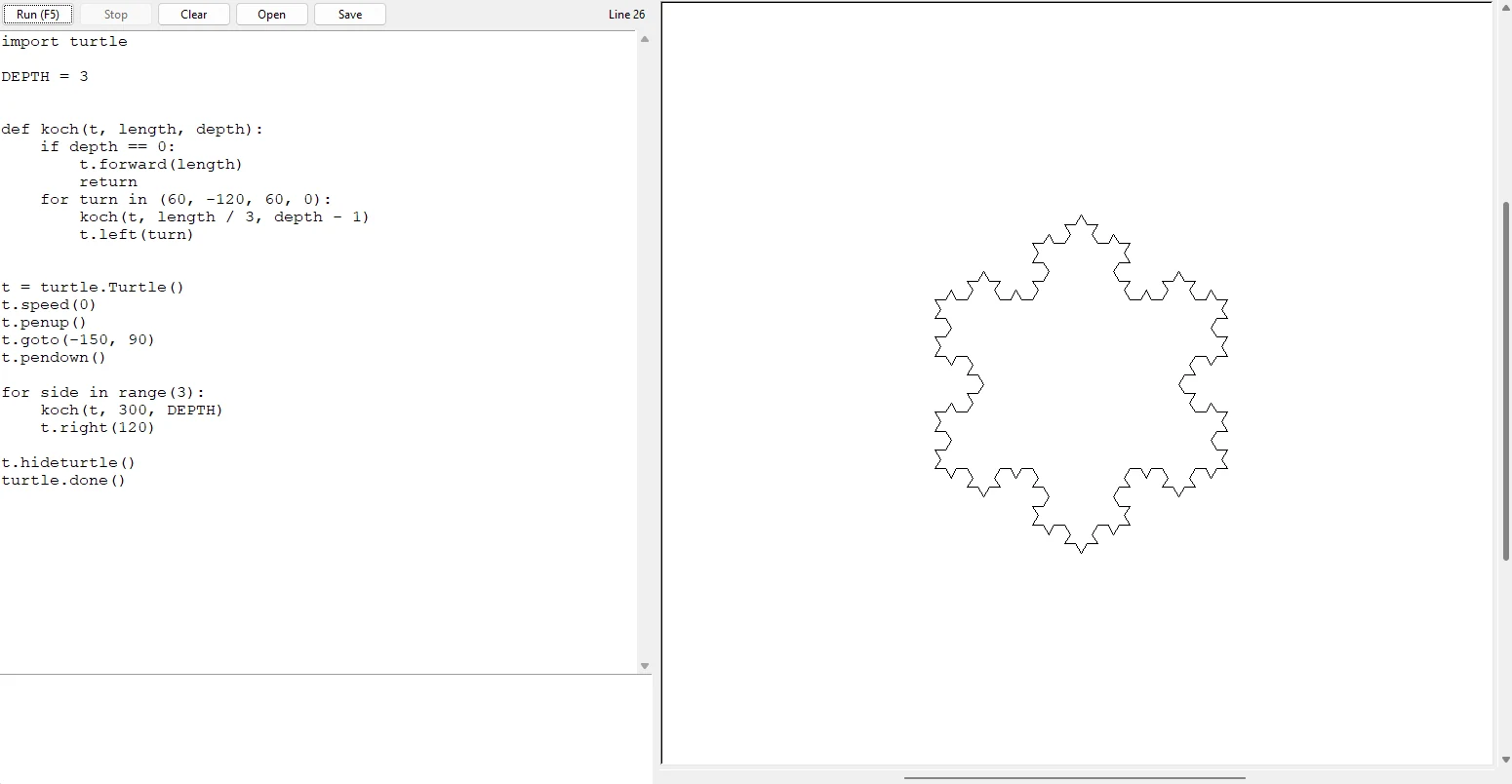
A second classic is the Koch snowflake. To draw a side, the turtle draws a smaller side, turns left 60 degrees, a smaller side, turns right 120 degrees, a smaller side, turns left 60 degrees, and a last smaller side. At depth 0, a side is simply a straight line.
import turtle

DEPTH = 3


def koch(t, length, depth):
    if depth == 0:
        t.forward(length)
        return
    for turn in (60, -120, 60, 0):
        koch(t, length / 3, depth - 1)
        t.left(turn)


t = turtle.Turtle()
t.speed(0)
t.penup()
t.goto(-150, 90)
t.pendown()

for side in range(3):
    koch(t, 300, DEPTH)
    t.right(120)

t.hideturtle()
turtle.done()DEPTH set to 0, 1, 2 and 3. Each
level replaces every straight line by four shorter ones.
When it goes wrong
AttributeError: partially initialized module 'turtle' has no
                attribute 'Turtle'
You named your own file turtle.py, so Python imports
your file instead of its own module. This is called
shadowing. Rename the file.
The window opens and closes at once. The program
has ended, and the window goes with it. End your program with
turtle.done().
An error that mentions tkinter. Your
Python has no Tk interface. Install it, see
Getting started.
_tkinter.TclError: no display name and no $DISPLAY environment
                variable
The turtle needs a real window to draw in, and this machine has no
screen to open one on. This also happens in an editor connected over
SSH, because the code then runs on the remote machine. Run it on a
computer with a desktop.
turtle.Terminator or another long error after
closing the window.
You closed the window while the turtle was still drawing. Nothing is
broken. Run the program again.
A big drawing takes forever. Every step is drawn on
the screen. Use t.speed(0). If that is not enough, put
turtle.tracer(0) before drawing and
turtle.update() after it.
The shape points another way than in a Logo example.
Logo's turtle starts facing north, Python's facing east.
turtle.mode("logo") as the first turtle command makes
Python start facing north too.
Next
Things to try: t.color("red"),
t.pensize(3), a filled shape between
t.begin_fill() and t.end_fill(), or a
random walk with t.left(random.randint(0, 360)) at
every step (after import random). The demo viewer from
Getting started shows what else the
module can do, with the source code next to each drawing.
Pen up, pen down, and lines instead of pixels: that is also how a pen plotter works. Turtle drawings on paper have their own note: Turtle Graphics on a Pen Plotter.
Sources
- Cynthia Solomon, Brian Harvey, Ken Kahn, Henry Lieberman, Mark L. Miller, Margaret Minsky, Artemis Papert and Brian Silverman, History of Logo, Proceedings of the ACM on Programming Languages 4, HOPL, Article 79 (June 2020). The main source for the history and the ideas on this page.
- Cynthia Solomon, The60s, logothings
- Cynthia Solomon, Exploring Turtle Geometry through Polygons and Spirals with TurtleArt
- Owen Holland, The first biologically inspired robots, Robotica 21 (2003): on Grey Walter's tortoises
- Seymour Papert, Mindstorms: Children, Computers, and Powerful Ideas (Basic Books, 1980)
- Harold Abelson and Andrea diSessa, Turtle Geometry: The Computer as a Medium for Exploring Mathematics (MIT Press; library catalogs give 1981, the History of Logo cites it as 1980)
- turtle: Turtle graphics, Python documentation
- Issue 1513695, Python bug tracker, and Gregor Lingl's 2008 message on edu-sig